Saturday, January 17, 2009

给Blogger添加Twitter工具栏

还是使用简单的JavaScript调用的办法。
添加一个HTML/JavaScript的小工具,填入以下内容:<div class="widget-content">
<div id="twitter_div"><ul id="twitter_update_list"></ul></div>
<script type="text/javascript" src="http://twitter.com/javascripts/blogger.js"></script>
<script type="text/javascript" src="http://twitter.com/statuses/user_timeline/zeronenorez.json?callback=twitterCallback2&count=20"></script>
<a href="http://twitter.com/zeronenorez" target="_blank">ReadMore</a>
</div>
</div>
将其中红色的部分改成自己的Twitter用户名即可!
由于我模板的原因,在显示内容的时候会在前面留下一部分的空隙,所以在Blogger模板里面添加以下内容到<head></head>之间:#twitter_div {width: 250px;margin-$startSide:-45px}
这样做的目的是把工具栏内容向前挪动45px的距离,这样就和标题对齐了。

Friday, January 16, 2009

终于知道卡巴斯基更新状态永远是0%是怎么回事啦!

诶呀妈呀,这几天真能把人郁闷死,不知何时卡巴斯基的病毒库就再也没有更新过,原以为是破解版卡巴斯基出什么问题了,换了好几个版本,换了巨多的Key,几乎所有的更新源。可是一点作用不起,永远是“ 更新永远是0%,然后操作超时,任务未被启动”。今天在深度论坛上无意中发现了问题的关键:GDI++与卡巴2009冲突导致卡巴更新不了。

解决办法:只要在GDI++.ini的[UnloadDLL]下面加入AVP.exe文件,禁止GDI++渲染卡巴斯基就可以了,今天卡巴终于开始更新拉!HOHO~

Tuesday, January 13, 2009

给自己的Blogger装上Recent Comments功能

以前装这个功能的时候走了很多弯路,看了很多说的复杂而且莫名其妙的教程,装上了一个外国网站提供的评论功能,终于可以在侧边栏上显示评论了,很漂亮。但是那个网站是用他自己的服务器存储留言数据的,然后每次再从外国网站上调用出来,速度实在没法恭维。如果需要那个漂亮评论栏的同志可以上这个网站:http://www.intensedebate.com/

这里提供一个更快速更简单的办法:

首先下载JS代码:
http://noodleblog.googlepages.com/rc4.js
把这个代码放到自己的ftp或者GooglePages上,没有Google账号的同志
Mail我,我可以给你发邀请函。

然后在Blogger页面元素里面添加一个HTML/JavaScript。填入以下代码:

<div class="widget-content">
<script>g_szBlogDomain='icnpunk.blogspot.com';
var g_szHead='';</script><script src="http://noodleblog.googlepages.com/rc4.js"></script>
</div>

蓝色部分替换为自己的博客地址,红色部分替换自己上传的JS代码,保存就可以了 。

---勤思考,苦钻研!

Sunday, January 11, 2009

给自己的Blogger装上继续阅读功能

综合了网上众多关于给Blogger加入Readmore的教程,大致分为一下三类:

首先是直接展开的方法;参考文章:Blogger hack: Expandable posts with Peekaboo view
中文教程参阅这里:http://joshnote.blogspot.com/2007/03/blogger-hacks-in-joshs-lifetagsread.html
教程中的JS代码地址已经不能使用了,这个是手快的兄弟转存的:http://rarunach.googlepages.com/hackosphere.js
说出去不怕丢人,这个方法我居然没有试成功。。。

其次是换链接的方法;参考文章:Blogger Beta 繼續閱讀功能改良
中文教程参阅这里:http://joshnote.blogspot.com/2007/03/blogger-hacks-in-joshs-lifetagsread.html

最后是使用Chen Jim Hao的傻瓜程序:http://cjhtech.blogspot.com/2007/02/blogger-3-htmlfor-blogger.html

综合了一下上面的几种方法我最重选择了第二个,因为更改方便,速度快,第三个傻瓜程序会有一定的延迟。每次载入的时候会先全部显示出来一段时间才缩进去,而第二种方法因为通过更改模板实现的,每次载入时只是一闪而过,很是迅速。

给出本博客使用的加入继续阅读功能的模板(跳转查看):
<?xml version="1.0" encoding="UTF-8" ?><!DOCTYPE html PUBLIC "-//W3C//DTD XHTML 1.0 Strict//EN" "http://www.w3.org/TR/xhtml1/DTD/xhtml1-strict.dtd"&gt;<html expr:dir='data:blog.languageDirection' xmlns='http://www.w3.org/1999/xhtml' xmlns:b='http://www.google.com/2005/gml/b' xmlns:data='http://www.google.com/2005/gml/data' xmlns:expr='http://www.google.com/2005/gml/expr'><head><b:include data='blog' name='all-head-content'/><meta content='GWGgp/NB6IXNcjSWRSnwinNduxUiVSTNeTzbQGwRt4M=' name='verify-v1'/><title><data:blog.pageTitle/></title><b:skin><![CDATA[/** Blogger Template Style* Herbert** by Jason Sutter* Updated by Blogger Team*/
/** Variable definitions* ====================
<Variable name="mainBgColor" description="Page Background Color"type="color" default="#ffffff" / value="#000000"><Variable name="mainTextColor" description="Text Color"type="color" default="#000000" / value="#008000">
<Variable name="titleBgColor" description="Blog Title Background Color"type="color" default="#ff4500" / value="#008000"><Variable name="titleColor" description="Blog Title Color"type="color" default="#fffafa"/ value="#000000"><Variable name="descriptionBgColor" description="Description Background Color"type="color" default="#ffebcd" / value="#000000"><Variable name="descriptionColor" description="Blog Description Color"type="color" default="#9e5205" / value="#008000">
<Variable name="dateHeaderColor" description="Date Header Color"type="color" default="#777777" / value="#008000">
<Variable name="postTitleColor" description="Post Title Color"type="color" default="#555555" / value="#00ff00"><Variable name="postTitleBgColor" description="Post Title Background Color"type="color" default="#eeeeee" / value="#004000">
<Variable name="postFooterColor" description="Post Footer Color"type="color" default="#444444" / value="#004000">
<Variable name="mainLinkColor" description="Link Color"type="color" default="#de7008" / value="#00ff00"><Variable name="mainVisitedLinkColor" description="Visited Link Color"type="color" default="#e0ad12" / value="#004000">
<Variable name="sidebarTitleColor" description="Sidebar Title Color"type="color" default="#ff4500" / value="#008000">
<Variable name="sidebarLinkColor" description="Sidebar Link Color"type="color" default="#999999" / value="#00ff00"><Variable name="sidebarVisitedLinkColor"description="Sidebar Visited Link Color"type="color" default="#de7008" / value="#004000">
<Variable name="bodyFont" description="Text Font"type="font" default="normal normal 90% 'Trebuchet MS', Trebuchet, Verdana, Sans-Serif" / value="normal normal 79% Trebuchet, Trebuchet MS, Arial, sans-serif"><Variable name="titleFont" description="Blog Title Font"type="font" default="normal bold 266% Verdana, Sans-Serif" / value="normal bold 187% Trebuchet, Trebuchet MS, Arial, sans-serif"><Variable name="descriptionFont" description="Blog Description Font"type="font" default="normal bold 85% Verdana, Sans-Serif" / value="normal bold 85% Verdana, sans-serif"><Variable name="postTitleFont" description="Post Title Font"type="font" default="normal bold 110% Verdana, Sans-serif" value="normal bold 110% Verdana, Sans-serif"><Variable name="sidebarTitleFont" description="Sidebar Title Font"type="font" default="normal bold 125% Verdana, Sans-Serif" / value="normal bold 100% Verdana, Sans-Serif"><Variable name="startSide" description="Start side in blog language"type="automatic" default="left" value="left"><Variable name="endSide" description="End side in blog language"type="automatic" default="right" value="left">*/body {margin: 0px;padding: 0px;background: $mainBgColor;color: $mainTextColor;font: $bodyFont;}
a {color: $mainLinkColor;text-decoration: none;}
a:hover {color: $mainVisitedLinkColor;text-decoration: underline;}
a:visited {color: $mainVisitedLinkColor;}
a img {border: 0;}
@media all {div#main-wrapper {float: $startSide;width: 72%;padding-top: 0;padding-$endSide: 1em;padding-bottom: 0px;padding-$startSide: 1em;word-wrap: break-word; /* fix for long text breaking sidebar float in IE */overflow: hidden; /* fix for long non-text content breaking IE sidebar float */}
div#sidebar-wrapper {margin: 0px;padding: 35px;text-align: $endSide;}
div#sidebar {width: 25%;float: $endSide;word-wrap: break-word; /* fix for long text breaking sidebar float in IE */overflow: hidden; /* fix for long non-text content breaking IE sidebar float */}}
#navbar-iframe {height:0px;visibility:hidden;display:none;}
#content-wrapper {margin-$endSide: 1em;}
@media handheld {div#main-wrapper {float: none;width: 90%;}
div#sidebar-wrapper {padding-top: 20px;padding-$endSide: 1em;padding-bottom: 0;padding-$startSide: 1em;text-align: $startSide;}}
#header {padding-top: 0px;padding-$endSide: 0px;padding-bottom: 8px;padding-$startSide: 0px;margin-top: 0px;margin-$endSide: 0px;margin-bottom: 20px;margin-$startSide: 0px;border-bottom: solid 2px $postTitleBgColor;border-top: solid 2px $descriptionBgColor;background: $descriptionBgColor;color: $descriptionColor;}
CODE {display: block; /* fixes a strange ie margin bug */font-family: Courier New;font-size: 9pt;overflow:auto;background: #191919 url(
https://blogger.googleusercontent.com/img/b/R29vZ2xl/AVvXsEhnMMvmJSOQzhyK9f1RUhojYoYBtqRLgoWtzGQmV_N3sJdlBV18FpaueRHi3IMK-6at4npw6odc9aarQbYOpl68c4KKtuKNuM9JF0SwrM9PQ_Bjhje6AMXaKCiHcDJ_yLVWdwc9cHFwgOM/s1600/Code_BG.gif) left top repeat-y;border: 1px dashed #00ff00;margin:2px 3px;padding: 10px 10px 10px 21px;max-height:200px;line-height: 1.2em;}
blockquote {display: block; /* fixes a strange ie margin bug */font-family: Courier New;font-size: 9pt;background: #191919;margin:1em 20px;border:1px dashed #333333;padding-left: 1ex;}
h1 a:link {color: $titleColor;}
h1 a:visited {color: $titleColor;}
h1 {padding-top: 18px;padding-$endSide: 0px;padding-bottom: 10px;padding-$startSide: 5%;margin-top: 0px;margin-$endSide: 10px;margin-bottom: 8px;margin-$startSide: 0px;border-top: solid 9px $sidebarTitleColor;border-bottom: solid 1px $descriptionColor;color: $titleColor;background: $titleBgColor;font: $titleFont;}
.description {padding-top: 0px;padding-$endSide: 0px;padding-bottom: 0px;padding-$startSide: 5%;margin: 0px;color: $descriptionColor;background: transparent;font: $descriptionFont;}
h3 {margin-top: 0px;margin-$endSide: 10px;margin-bottom: 10px;margin-$startSide: 0px;padding-top: 2px;padding-$endSide: 0px;padding-bottom: 2px;padding-$startSide: 2px;color: $postTitleColor;background: $postTitleBgColor;font: $postTitleFont;}
h3.post-title a,h3.post-title a:visited {color: $postTitleColor;}
h2.date-header {margin-top: 10px;margin-$endSide: 0px;margin-bottom: 0px;margin-$startSide: 0px;padding-top: 0px;padding-$endSide: 0px;padding-bottom: 0px;padding-$startSide: 2%;color: $dateHeaderColor;font-size: 90%;text-align: $startSide;}
#sidebar h2 {margin: 0px;color: $sidebarTitleColor;font: $sidebarTitleFont;padding: 0px;border: none;}
#sidebar .widget {margin-top: 0px;margin-$endSide: 0px;margin-bottom: 33px;margin-$startSide: 5px;padding: 0;}
#sidebar ul {list-style-type: none;font-size: 95%;margin-top: 0;}
#sidebar li {margin: 5px;padding: 0px;list-style-type: none;font-size: 105%;}
.Blog {margin-top: 20px;}
.blog-posts, .feed-links {margin-$startSide: 10px;}
.feed-links {clear: both;line-height: 2.5em;}
.post {margin-top: 0;margin-$endSide: 0;margin-bottom: 30px;margin-$startSide: 0;font-size: 100%;}
.post-body {margin-top: 0;margin-$endSide: 6px;margin-bottom: 0;margin-$startSide: 5px;}
.post strong {font-weight: bold;}
#sidebar a {text-decoration: none;}
#sidebar a:link,#sidebar a:visited {color: $sidebarLinkColor;}
#sidebar a:active,#sidebar a:hover {color: $sidebarVisitedLinkColor;}
pre,code,strike,blockquote {color: #666666;}
.post-footer {padding-top: 0;padding-$endSide: 0;padding-bottom: 0;padding-$startSide: 5px;margin: 0px;color: $postFooterColor;font-size: 80%;}
#comments {padding-top: 2px;padding-$endSide: 0px;padding-bottom: 2px;padding-$startSide: 5px;font-size: 110%;font-weight: bold;font-family: Verdana,Sans-Serif;}
.comment-author {margin-top: 20px;}
.comment-body {margin-top: 10px;font-size: 100%;font-weight: normal;color: $mainTextColor;}
.comment-footer {padding: 0px;margin-bottom: 20px;color: $postFooterColor;font-size: 80%;font-weight: normal;display: inline;margin-$endSide: 10px;}
.deleted-comment {font-style: italic;color: gray;}
.comment-link {margin-$startSide: .6em;}
/* Profile----------------------------------------------- */.profile-textblock {clear: both;margin-$startSide: 0;}.profile-img {margin-top: 0;margin-$endSide: 0;margin-bottom: 5px;margin-$startSide: 5px;float: $endSide;}
.BlogArchive #ArchiveList {float: $endSide;}
.widget-content {margin-top: 0.5em;}
#sidebar .widget {clear: both;}
#blog-pager-newer-link {float: $startSide;}
.blog-pager-older-link {float: $endSide;}
.blog-pager {text-align: center;}
.clear {clear: both;}
/** Tweaks for subscribe widget */.widget-content .subscribe-wrapper {float: left;clear: left;margin: .2em;font-family: Arial,Sans-Serif;}
/** Tweaks for layout editor mode */body#layout #outer-wrapper {margin-top: 10px;}]]></b:skin>
<script type='text/Javascript'>function hidePost(postUrl){var label=document.getElementById("fullpost");if(label!=null){eA = document.createElement("a");eA.setAttribute("href",postUrl);eA.setAttribute("title","Read More");eA.appendChild(document.createTextNode("...Read More"));eB = document.createElement("p");eB.setAttribute("id","read-more");eB.appendChild(eA);label.parentNode.appendChild(eB);label.parentNode.removeChild(label);}}</script></head>
<body> <div id='outer-wrapper'><div id='wrap2'>
<!-- skip links for text browsers --><span id='skiplinks' style='display:none;'><a href='#main'>skip to main </a> <a href='#sidebar'>skip to sidebar</a></span>
<div id='header-wrapper'><b:section class='header' id='header' maxwidgets='1' showaddelement='no'><b:widget id='Header1' locked='true' title='iCNPunk --- Chinese National Punk (Header)' type='Header'><b:includable id='main'>
<b:if cond='data:useImage'> <b:if cond='data:imagePlacement == "REPLACE"'> <!--Show just the image, no text--> <div id='header-inner'> <a expr:href='data:blog.homepageUrl' style='display: block'> <img expr:alt='data:title' expr:height='data:height' expr:id='data:widget.instanceId + "_headerimg"' expr:src='data:sourceUrl' expr:width='data:width' style='display: block'/> </a> </div> <b:else/> <!-- Show image as background to text. You can't really calculate the width reliably in JS because margins are not taken into account by any of clientWidth, offsetWidth or scrollWidth, so we don't force a minimum width if the user is using shrink to fit. This results in a margin-width's worth of pixels being cropped. If the user is not using shrink to fit then we expand the header. --> <div expr:style='"background-image: url(\"" + data:sourceUrl + "\"); " + "background-position: " + data:backgroundPositionStyleStr + "; " + data:widthStyleStr + "min-height: " + data:height + "px;" + "_height: " + data:height + "px;" + "background-repeat: no-repeat; "' id='header-inner'> <div class='titlewrapper' style='background: transparent'> <h1 class='title' style='background: transparent; border-width: 0px'> <b:include name='title'/> </h1> </div> <b:include name='description'/> </div> </b:if> <b:else/> <!--No header image --> <div id='header-inner'> <div class='titlewrapper'> <h1 class='title'> <b:include name='title'/> </h1> </div> <b:include name='description'/> </div> </b:if></b:includable><b:includable id='title'> <b:if cond='data:blog.url == data:blog.homepageUrl'> <data:title/> <b:else/> <a expr:href='data:blog.homepageUrl'><data:title/></a> </b:if></b:includable><b:includable id='description'> <div class='descriptionwrapper'> <p class='description'><span><data:description/></span></p> </div></b:includable></b:widget></b:section></div>
<div id='content-wrapper'>
<div id='crosscol-wrapper' style='text-align:center'><b:section class='crosscol' id='crosscol' showaddelement='no'/></div>
<div id='main-wrapper'><b:section class='main' id='main' showaddelement='no'><b:widget id='Blog1' locked='true' title='Blog Posts' type='Blog'><b:includable id='nextprev'> <div class='blog-pager' id='blog-pager'> <b:if cond='data:newerPageUrl'> <span id='blog-pager-newer-link'> <a class='blog-pager-newer-link' expr:href='data:newerPageUrl' expr:id='data:widget.instanceId + "_blog-pager-newer-link"' expr:title='data:newerPageTitle'><data:newerPageTitle/></a> </span> </b:if>
<b:if cond='data:olderPageUrl'> <span id='blog-pager-older-link'> <a class='blog-pager-older-link' expr:href='data:olderPageUrl' expr:id='data:widget.instanceId + "_blog-pager-older-link"' expr:title='data:olderPageTitle'><data:olderPageTitle/></a> </span> </b:if>
<b:if cond='data:blog.homepageUrl != data:blog.url'> <a class='home-link' expr:href='data:blog.homepageUrl'><data:homeMsg/></a> <b:else/> <b:if cond='data:newerPageUrl'> <a class='home-link' expr:href='data:blog.homepageUrl'><data:homeMsg/></a> </b:if> </b:if>
</div> <div class='clear'/></b:includable><b:includable id='backlinks' var='post'> <a name='links'/><h4><data:post.backlinksLabel/></h4> <b:if cond='data:post.numBacklinks != 0'> <dl class='comments-block' id='comments-block'> <b:loop values='data:post.backlinks' var='backlink'> <div class='collapsed-backlink backlink-control'> <dt class='comment-title'> <span class='backlink-toggle-zippy'> </span> <a expr:href='data:backlink.url' rel='nofollow'><data:backlink.title/></a> <b:include data='backlink' name='backlinkDeleteIcon'/> </dt> <dd class='comment-body collapseable'> <data:backlink.snippet/> </dd> <dd class='comment-footer collapseable'> <span class='comment-author'><data:post.authorLabel/> <data:backlink.author/></span> <span class='comment-timestamp'><data:post.timestampLabel/> <data:backlink.timestamp/></span> </dd> </div> </b:loop> </dl> </b:if> <p class='comment-footer'> <a class='comment-link' expr:href='data:post.createLinkUrl' expr:id='data:widget.instanceId + "_backlinks-create-link"' target='_blank'><data:post.createLinkLabel/></a> </p></b:includable><b:includable id='post' var='post'> <div class='post hentry'> <a expr:name='data:post.id'/> <b:if cond='data:post.title'> <h3 class='post-title entry-title'> <b:if cond='data:post.link'> <a expr:href='data:post.link'><data:post.title/></a> <b:else/> <b:if cond='data:post.url'> <a expr:href='data:post.url'><data:post.title/></a> <b:else/> <data:post.title/> </b:if> </b:if> </h3> </b:if>
<div class='post-header-line-1'/>
<div class='post-body entry-content'> <data:post.body/>
<b:if cond='data:blog.pageType != "item"'><b:if cond='data:post.url'><script type='text/javascript'>hidePost('<data:post.url/>');</script></b:if></b:if>
<div style='clear: both;'/> <!-- clear for photos floats --> </div>
<div class='post-footer'> <div class='post-footer-line post-footer-line-1'><span class='post-timestamp'> <b:if cond='data:top.showTimestamp'> <data:top.timestampLabel/> <b:if cond='data:post.url'> <a class='timestamp-link' expr:href='data:post.url' rel='bookmark' title='permanent link'><abbr class='published' expr:title='data:post.timestampISO8601'><data:post.timestamp/></abbr></a> </b:if> </b:if> </span> <span class='post-comment-link'> <b:if cond='data:blog.pageType != "item"'> <b:if cond='data:post.allowComments'> <a class='comment-link' expr:href='data:post.addCommentUrl' expr:onclick='data:post.addCommentOnclick'><b:if cond='data:post.numComments == 1'>1 <data:top.commentLabel/><b:else/><data:post.numComments/> <data:top.commentLabelPlural/></b:if></a> </b:if> </b:if> </span> <span class='post-backlinks post-comment-link'> <b:if cond='data:blog.pageType != "item"'> <b:if cond='data:post.showBacklinks'> <a class='comment-link' expr:href='data:post.url + "#links"'><data:top.backlinkLabel/></a> </b:if> </b:if> </span> <span class='post-icons'> <!-- email post links --> <b:if cond='data:post.emailPostUrl'> <span class='item-action'> <a expr:href='data:post.emailPostUrl' expr:title='data:top.emailPostMsg'> <img alt='' class='icon-action' height='13' src='http://www.blogger.com/img/icon18_email.gif' width='18'/> </a> </span> </b:if>
<!-- quickedit pencil --> <b:include data='post' name='postQuickEdit'/> </span> </div>
<div class='post-footer-line post-footer-line-2'/>
<div class='post-footer-line post-footer-line-3'/> </div> </div></b:includable><b:includable id='commentDeleteIcon' var='comment'> <span expr:class='"item-control " + data:comment.adminClass'> <a expr:href='data:comment.deleteUrl' expr:title='data:top.deleteCommentMsg'> <img src='http://www.blogger.com/img/icon_delete13.gif'/> </a> </span></b:includable><b:includable id='status-message'> <b:if cond='data:navMessage'> <div class='status-msg-wrap'> <div class='status-msg-body'> <data:navMessage/> </div> <div class='status-msg-border'> <div class='status-msg-bg'> <div class='status-msg-hidden'><data:navMessage/></div> </div> </div> </div> <div style='clear: both;'/> </b:if></b:includable><b:includable id='feedLinks'> <b:if cond='data:blog.pageType != "item"'> <!-- Blog feed links --> <b:if cond='data:feedLinks'> <div class='blog-feeds'> <b:include data='feedLinks' name='feedLinksBody'/> </div> </b:if>
<b:else/> <!--Post feed links --> <div class='post-feeds'> <b:loop values='data:posts' var='post'> <b:if cond='data:post.allowComments'> <b:if cond='data:post.feedLinks'> <b:include data='post.feedLinks' name='feedLinksBody'/> </b:if> </b:if> </b:loop> </div> </b:if></b:includable><b:includable id='comment-form' var='post'> <div class='comment-form'> <a name='comment-form'/> <h4 id='comment-post-message'><data:postCommentMsg/></h4> <p><data:blogCommentMessage/></p> <data:blogTeamBlogMessage/> <a expr:href='data:post.commentFormIframeSrc' id='comment-editor-src'/> <iframe allowtransparency='true' class='blogger-iframe-colorize' frameborder='0' height='275' id='comment-editor' scrolling='no' src='' width='100%'/> <data:post.iframeColorizer/> </div></b:includable><b:includable id='backlinkDeleteIcon' var='backlink'> <span expr:class='"item-control " + data:backlink.adminClass'> <a expr:href='data:backlink.deleteUrl' expr:title='data:top.deleteBacklinkMsg'> <img src='http://www.blogger.com/img/icon_delete13.gif'/> </a> </span></b:includable><b:includable id='feedLinksBody' var='links'> <div class='feed-links'> <data:feedLinksMsg/> <b:loop values='data:links' var='f'> <a class='feed-link' expr:href='data:f.url' expr:type='data:f.mimeType' target='_blank'><data:f.name/> (<data:f.feedType/>)</a> </b:loop> </div></b:includable><b:includable id='postQuickEdit' var='post'> <b:if cond='data:post.editUrl'> <span expr:class='"item-control " + data:post.adminClass'> <a expr:href='data:post.editUrl' expr:title='data:top.editPostMsg'> <img alt='' class='icon-action' height='18' src='http://www.blogger.com/img/icon18_edit_allbkg.gif' width='18'/> </a> </span> </b:if></b:includable><b:includable id='comments' var='post'> <div class='comments' id='comments'> <a name='comments'/> <b:if cond='data:post.allowComments'> <h4> <b:if cond='data:post.numComments == 1'> 1 <data:commentLabel/>: <b:else/> <data:post.numComments/> <data:commentLabelPlural/>: </b:if> </h4>
<b:if cond='data:post.commentPagingRequired'> <span class='paging-control-container'> <a expr:class='data:post.oldLinkClass' expr:href='data:post.oldestLinkUrl'><data:post.oldestLinkText/></a> <a expr:class='data:post.oldLinkClass' expr:href='data:post.olderLinkUrl'><data:post.olderLinkText/></a> <data:post.commentRangeText/> <a expr:class='data:post.newLinkClass' expr:href='data:post.newerLinkUrl'><data:post.newerLinkText/></a> <a expr:class='data:post.newLinkClass' expr:href='data:post.newestLinkUrl'><data:post.newestLinkText/></a> </span> </b:if>
<dl id='comments-block'> <b:loop values='data:post.comments' var='comment'> <dt expr:class='"comment-author " + data:comment.authorClass' expr:id='data:comment.anchorName'> <a expr:name='data:comment.anchorName'/> <b:if cond='data:comment.authorUrl'> <a expr:href='data:comment.authorUrl' rel='nofollow'><data:comment.author/></a> <b:else/> <data:comment.author/> </b:if> <data:commentPostedByMsg/> </dt> <dd class='comment-body'> <b:if cond='data:comment.isDeleted'> <span class='deleted-comment'><data:comment.body/></span> <b:else/> <p><data:comment.body/></p> </b:if> </dd> <dd class='comment-footer'> <span class='comment-timestamp'> <a expr:href='data:comment.url' title='comment permalink'> <data:comment.timestamp/> </a> <b:include data='comment' name='commentDeleteIcon'/> </span> </dd> </b:loop> </dl>
<b:if cond='data:post.commentPagingRequired'> <span class='paging-control-container'> <a expr:class='data:post.oldLinkClass' expr:href='data:post.oldestLinkUrl'> <data:post.oldestLinkText/> </a> <a expr:class='data:post.oldLinkClass' expr:href='data:post.olderLinkUrl'> <data:post.olderLinkText/> </a> <data:post.commentRangeText/> <a expr:class='data:post.newLinkClass' expr:href='data:post.newerLinkUrl'> <data:post.newerLinkText/> </a> <a expr:class='data:post.newLinkClass' expr:href='data:post.newestLinkUrl'> <data:post.newestLinkText/> </a> </span> </b:if>
<p class='comment-footer'>
<b:if cond='data:post.embedCommentForm'> <b:include data='post' name='comment-form'/> <b:else/> <b:if cond='data:post.allowComments'> <a expr:href='data:post.addCommentUrl' expr:onclick='data:post.addCommentOnclick'><data:postCommentMsg/></a> </b:if> </b:if>
</p> </b:if>
<div id='backlinks-container'> <div expr:id='data:widget.instanceId + "_backlinks-container"'> <b:if cond='data:post.showBacklinks'> <b:include data='post' name='backlinks'/> </b:if> </div> </div> </div></b:includable><b:includable id='main' var='top'> <!-- posts --> <div class='blog-posts hfeed'>
<b:include data='top' name='status-message'/>
<data:adStart/> <b:loop values='data:posts' var='post'> <b:if cond='data:post.dateHeader'> <h2 class='date-header'><data:post.dateHeader/></h2> </b:if> <b:include data='post' name='post'/> <b:if cond='data:blog.pageType == "item"'> <b:include data='post' name='comments'/> </b:if> <b:if cond='data:post.includeAd'> <data:adEnd/> <data:adCode/> <data:adStart/> </b:if> </b:loop> <data:adEnd/> </div>
<!-- navigation --> <b:include name='nextprev'/>
<!-- feed links --> <b:include name='feedLinks'/> <b:if cond='data:top.showStars'> <script src='http://www.google.com/jsapi' type='text/javascript'/> <script type='text/javascript'> google.load("annotations", "1", {"locale": "<data:top.languageCode/>"}); function initialize() { google.annotations.setApplicationId(<data:top.blogspotReviews/>); google.annotations.createAll(); google.annotations.fetch(); } google.setOnLoadCallback(initialize); </script> </b:if>
</b:includable></b:widget></b:section></div>
<div id='sidebar-wrapper'><b:section class='sidebar' id='sidebar' preferred='yes'><b:widget id='HTML4' locked='false' title='Search This Blog' type='HTML'><b:includable id='main'> <!-- only display title if it's non-empty --> <b:if cond='data:title != ""'> <h2 class='title'><data:title/></h2> </b:if> <div class='widget-content'> <data:content/> </div>
<b:include name='quickedit'/></b:includable></b:widget><b:widget id='Profile1' locked='false' title='About Me' type='Profile'><b:includable id='main'> <b:if cond='data:title != ""'> <h2><data:title/></h2> </b:if> <div class='widget-content'> <b:if cond='data:team == "true"'> <!-- team blog profile --> <ul> <b:loop values='data:authors' var='i'> <li><a expr:href='data:i.userUrl'><data:i.display-name/></a></li> </b:loop> </ul>
<b:else/> <!-- normal blog profile -->
<b:if cond='data:photo.url != ""'> <a expr:href='data:userUrl'><img class='profile-img' expr:alt='data:photo.alt' expr:height='data:photo.height' expr:src='data:photo.url' expr:width='data:photo.width'/></a> </b:if>
<dl class='profile-datablock'> <dt class='profile-data'><data:displayname/></dt>
<b:if cond='data:showlocation == "true"'> <dd class='profile-data'><data:location/></dd> </b:if>
<b:if cond='data:aboutme != ""'><dd class='profile-textblock'><data:aboutme/></dd></b:if> </dl> <a class='profile-link' expr:href='data:userUrl'><data:viewProfileMsg/></a> </b:if>
<b:include name='quickedit'/> </div> </b:includable></b:widget><b:widget id='TextList1' locked='false' title='Connect' type='TextList'><b:includable id='main'> <h2><data:title/></h2> <div class='widget-content'> <ul> <b:loop values='data:items' var='item'> <li><data:item/></li> </b:loop> </ul> <b:include name='quickedit'/> </div></b:includable></b:widget><b:widget id='Followers1' locked='false' title='Followers' type='Followers'><b:includable id='main'> <b:if cond='data:title != ""'> <b:if cond='data:codeSnippet != ""'> <h2 class='title'><data:title/></h2> <b:else/> <b:if cond='data:totalFollowerCount != ""'> <h2 class='title'><data:title/> (<data:totalFollowerCount/>)</h2> </b:if> </b:if> </b:if>
<div expr:id='data:widget.instanceId + "-wrapper"'> <b:if cond='data:codeSnippet != ""'> <div style='margin:2px;'> <data:codeSnippet/> </div> <b:else/> <b:if cond='data:totalFollowerCount == ""'> <span class='item-control following-not-admin'> <b><data:failureSnippet/></b> </span> <span class='item-control blog-admin'> <b><data:adminFailureSnippet/></b> </span> <b:else/> <b:if cond='data:followingLinkPresent'> <div class='follow-this profile-link item-control following-follow-this'> <a expr:href='"javascript:_FollowersView._openPopup(\"" + data:followUri + "\");"'> <data:followThisMessage/> </a> </div> <div class='follow-this profile-link item-control following-stop-following-this'> <a expr:href='"javascript:_FollowersView._openPopup(\"" + data:followUri + "\");"'> <data:stopFollowingMessage/> </a> </div> </b:if>
<div class='followers-grid'> <b:if cond='data:totalFollowerCount == 0'> <div class='profile-link item-control following-follow-this'> <data:emptyFollowersMessage/> </div> </b:if> <!-- Relies on the js written out in navbar.gxp --> <b:loop values='data:followers' var='follower'> <div class='follower'> <a expr:href='data:follower.profileUrl' expr:title='data:follower.displayName' rel='nofollow'> <img class='follower-img' expr:alt='data:follower.displayName' expr:height='data:follower.imageHeight' expr:onerror='"this.onerror=null;this.src=\"" + data:anonFollowerImageUrl + "\";"' expr:onload='"setAttributeOnload(this, \"src\", \"" + data:follower.imageUrl + "\")"' expr:width='data:follower.imageWidth' src='http://img1.blogblog.com/img/blank.gif'/> </a> </div> </b:loop> <div class='clear'/> </div>
<div class='followers-canvas profile-link'> <data:followersFooterMessage/> <span class='item-control following-not-admin'> <a expr:href='data:followersUri'> <data:viewAllMessage/> </a> </span> <span class='item-control blog-admin'> <a expr:href='data:manageFollowersUri'> <data:manageFollowersMessage/> </a> </span> </div> </b:if> </b:if> <b:include name='quickedit'/> </div></b:includable></b:widget><b:widget id='BlogArchive1' locked='false' title='Blog Archive' type='BlogArchive'><b:includable id='main'> <b:if cond='data:title'> <h2><data:title/></h2> </b:if> <div class='widget-content'> <div id='ArchiveList'> <div expr:id='data:widget.instanceId + "_ArchiveList"'> <b:if cond='data:style == "HIERARCHY"'> <b:include data='data' name='interval'/> </b:if> <b:if cond='data:style == "FLAT"'> <b:include data='data' name='flat'/> </b:if> <b:if cond='data:style == "MENU"'> <b:include data='data' name='menu'/> </b:if> </div> </div> <b:include name='quickedit'/> </div></b:includable><b:includable id='flat' var='data'> <ul> <b:loop values='data:data' var='i'> <li class='archivedate'> <a expr:href='data:i.url'><data:i.name/></a> (<data:i.post-count/>) </li> </b:loop> </ul></b:includable><b:includable id='menu' var='data'> <select expr:id='data:widget.instanceId + "_ArchiveMenu"'> <option value=''><data:title/></option> <b:loop values='data:data' var='i'> <option expr:value='data:i.url'><data:i.name/> (<data:i.post-count/>)</option> </b:loop> </select></b:includable><b:includable id='interval' var='intervalData'> <b:loop values='data:intervalData' var='i'> <ul> <li expr:class='"archivedate " + data:i.expclass'> <b:include data='i' name='toggle'/> <a class='post-count-link' expr:href='data:i.url'><data:i.name/></a> <span class='post-count' dir='ltr'>(<data:i.post-count/>)</span> <b:if cond='data:i.data'> <b:include data='i.data' name='interval'/> </b:if> <b:if cond='data:i.posts'> <b:include data='i.posts' name='posts'/> </b:if> </li> </ul> </b:loop></b:includable><b:includable id='toggle' var='interval'> <b:if cond='data:interval.toggleId'> <b:if cond='data:interval.expclass == "expanded"'> <a class='toggle' expr:href='data:widget.actionUrl + "&action=toggle" + "&dir=close&toggle=" + data:interval.toggleId + "&toggleopen=" + data:toggleopen'> <span class='zippy toggle-open'>▼ </span> </a> <b:else/> <a class='toggle' expr:href='data:widget.actionUrl + "&action=toggle" + "&dir=open&toggle=" + data:interval.toggleId + "&toggleopen=" + data:toggleopen'> <span class='zippy'> <b:if cond='data:blog.languageDirection == "rtl"'> ◄ <b:else/> ► </b:if> </span> </a> </b:if> </b:if></b:includable><b:includable id='posts' var='posts'> <ul class='posts'> <b:loop values='data:posts' var='i'> <li><a expr:href='data:i.url'><data:i.title/></a></li> </b:loop> </ul></b:includable></b:widget><b:widget id='Subscribe1' locked='false' title='Subscribe To' type='Subscribe'><b:includable id='main'> <b:if cond='data:isPublic'> <div style='white-space:nowrap'>
<b:if cond='data:title != ""'> <h2 class='title'><data:title/></h2> </b:if> <div class='widget-content'> <b:loop values='data:feeds' var='feed'> <div expr:class='"subscribe-wrapper subscribe-type-" + data:feed.type'>
<div expr:class='"subscribe expanded subscribe-type-" + data:feed.type' expr:id='"SW_READER_LIST_" + data:widgetId + data:feed.type' style='display:none;'>
<div class='top'> <span class='inner' expr:onclick='"return(_SW_toggleReaderList(event, \"" + data:widgetId +data:feed.type + "\"));"'> <img class='subscribe-dropdown-arrow' expr:src='data:arrowDropdownImg'/> <img align='absmiddle' alt='' border='0' class='feed-icon' expr:src='data:feedIconImg'/> <data:feed.title/> </span>
<ul class='feed-reader-links'> <a class='feed-reader-link' expr:href='"http://www.google.com/ig/add?source=bstp&feedurl=" + data:feed.encodedUrl' target='_blank'> <img expr:src='data:imagePathBase + "subscribe-google.png"'/> </a> <a class='feed-reader-link' expr:href='"http://www.bloglines.com/sub/" + data:feed.url' target='_blank'> <img expr:src='data:imagePathBase + "subscribe-bloglines.png"'/> </a> <a class='feed-reader-link' expr:href='"http://www.netvibes.com/subscribe.php?url=" + data:feed.encodedUrl' target='_blank'> <img expr:src='data:imagePathBase + "subscribe-netvibes.png"'/> </a> <a class='feed-reader-link' expr:href='"http://www.newsgator.com/ngs/subscriber/subext.aspx?url=" + data:feed.encodedUrl' target='_blank'> <img expr:src='data:imagePathBase + "subscribe-newsgator.png"'/> </a> <a class='feed-reader-link' expr:href='"http://add.my.yahoo.com/content?url=" + data:feed.encodedUrl' target='_blank'> <img expr:src='data:imagePathBase + "subscribe-yahoo.png"'/> </a> <a class='feed-reader-link' expr:href='data:feed.url' target='_blank'> <img align='absmiddle' class='feed-icon' expr:src='data:feedIconImg'/> Atom </a> </ul>
</div> <div class='bottom'/> </div> <div class='subscribe' expr:id='"SW_READER_LIST_CLOSED_" + data:widgetId +data:feed.type' expr:onclick='"return(_SW_toggleReaderList(event, \"" + data:widgetId +data:feed.type + "\"));"'> <div class='top'> <span class='inner'> <img class='subscribe-dropdown-arrow' expr:src='data:arrowDropdownImg'/> <span expr:onclick='"return(_SW_toggleReaderList(event, \"" + data:widgetId +data:feed.type + "\"));"'> <img align='absmiddle' alt='' border='0' class='feed-icon' expr:src='data:feedIconImg'/> <data:feed.title/> </span> </span> </div> <div class='bottom'/> </div> </div> </b:loop>
<div style='clear:both'/>
</div> </div>
<b:include name='quickedit'/>
</b:if></b:includable></b:widget><b:widget id='HTML2' locked='false' title='Music Player' type='HTML'><b:includable id='main'> <!-- only display title if it's non-empty --> <b:if cond='data:title != ""'> <h2 class='title'><data:title/></h2> </b:if> <div class='widget-content'> <data:content/> </div>
<b:include name='quickedit'/></b:includable></b:widget><b:widget id='HTML3' locked='false' title='Recent Comments' type='HTML'><b:includable id='main'> <!-- only display title if it's non-empty --> <b:if cond='data:title != ""'> <h2 class='title'><data:title/></h2> </b:if> <div class='widget-content'> <data:content/> </div>
<b:include name='quickedit'/></b:includable></b:widget><b:widget id='HTML1' locked='false' title='' type='HTML'><b:includable id='main'> <!-- only display title if it's non-empty --> <b:if cond='data:title != ""'> <h2 class='title'><data:title/></h2> </b:if> <div class='widget-content'> <data:content/> </div>
<b:include name='quickedit'/></b:includable></b:widget></b:section></div>
<!-- spacer for skins that want sidebar and main to be the same height--><div class='clear'> </div>
</div> <!-- end content-wrapper --></div></div> <!-- end outer-wrapper --></body></html>


替换时还是要注意先勾选扩展窗口小部件模板的选框保存再覆盖。
---人说漂亮的女人最毒恶,追求漂亮总是要付出代价的。

Friday, January 09, 2009

Palm Pre发布,股价上升35%

Palm 才刚发布 Palm Pre及新的 Web OS,股价就狂升35%啰!
小胖子准备复活了么?期待中...

Palm Pre 多图鉴赏:


小金库还有库存的同志们就赶快上手吧~!!

Sunday, January 04, 2009

RHCE课本到手了,美一个!

今天拿到RHCE官方课本了,超级棒~~我说的是厚度。除了没本前面的介绍以外 033有407页、131(新的5.1教材中133的名称改成131了)有315页、253有356页,均包含Lab板块。如果在网上买到书的同学和这个不一样,嘿嘿,赶快找人算账吧~~

Thursday, January 01, 2009

解决金山词霸2009的各种问题(更新)

前几天才下的金山词霸转眼就不能用了,很是郁闷,网上找了找解决的办法,很多地方都有。我给自己留个方便吧,转载到这里:

首先:进入C:\Documents and Settings\你的用户名\Application Data\ 和 C:\Documents and Settings\All users\Application Data\,删除里面kingsoft文件夹什么。(记住,两个文件夹都必须删除)你看不到Application Data文件夹? 工具->文件夹选项->查看,点掉“隐藏受保护的操作系统文件”前面的勾就行了。

然后:点击下载新的破解补丁,解压覆盖到金山词霸2009的安装目录就行了,然后这时断网启动金山词霸2009,再设置词霸,找到设置代理服务器那一项,随便填入一个IP地址,不要能用的。这是为了防止金山词霸再次联网失效。

最后:希望CE友们能用好金山词霸学好Linux顺利通过RHCE考试。

=====以下内容为2009年1月11日2:04:24加入的更新=====
先按上面的办法删除吊两个Kingsoft文件夹,然后使用以下地址提供的破解包破解词霸:
牛津版 "MyCrack"破解修正第5版:(增加"免通行证破解补丁"~)
http://www.xdowns.com/soft/23/203/2008/Soft_48223.html

Monday, December 29, 2008

VMware中使用RHEL5的小技巧

在用VMware学习Redhat的时候需要开启虚拟机实际联系,但是由于字体系统等的关系操作起来很不方便,一般情况下我都喜欢一边放着视频一边进行操作,这时候需要对系统进行一些小的调整以便我们更好的学习。
1.安装VMware-Tools
如果不安装VMware-Tools的话对于学习来说实在是很不方便,因此这是必不可少的第一步。具体给RHEL5安装VMware-Tools的方法请见这篇文章:
给RHEL5装上vmware-tools 。

2.调整系统字体
字体过大会影响我们的观看,字体过小会让人感觉疲劳,这个因个人喜好而定。

3.调整Gnome菜单高度
Gnome默认主题的菜单都很高,但是软件过多条目又长往往浪费掉我们一部分时间。这里给出调整的方法:
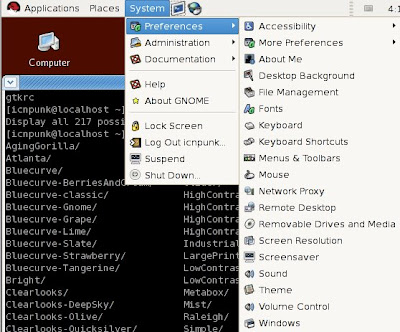
先查看自己使用的是什么主题(System >> Preferences >> Theme)。如果是系统则存在于/usr/share/themes下面,如果是自己安装的一般存在于HOME目录的.themes下面。现在只介绍系统主题的修改办法,自定主题用同样的方法即可。

我用的是Clearlooks-Deepsky的主题,那就编辑他的主题文件:
sudo gedit /usr/share/themes/Clearlooks-DeepSky/gtk-2.0/gtkrc
在主题文件的最上面加上下面这段代码:
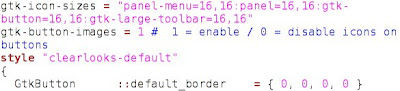
gtk-icon-sizes = "panel-menu=16,16:panel=16,16:gtk-button=16,16:gtk-large-toolbar=16,16"
gtk-button-images = 1 # 1 = enable / 0 = disable icons on buttons
例如我的gtkrc文件:


然后再选中修改过的主题就会把系统菜单高度缩小了:


这样子在学习的时候就会赏心多了。


Sunday, December 28, 2008

西安地区想考RHCE的同学们有福啦

西安地区Redhat考试认证机构:西安昇旭信息技术有限公司提供RHCE的认证考试。

西安总部
地址:西安市高新区高新路31号凯创国际2幢1302室
邮编:710075
电话:029-8824 8109
传真:029-8824 8109
Email:linuxs21@163.com
QQ: 345227560 710988168
网站:
http://www.xalinux.org/

地图标记:
这~~~不是广告! (一般人我不告诉他)

RHCE学习资料

由于RHCE考试用的是英文的试题,所以学习的时候还是用英文比较好。放出三本官方教材以及两套视频下载地址。

RHCE考试官方英语教材(这个是必学的教材):

内含RH033,RH133,RH253
http://www.rayfile.com/zh-cn/files/80da1994-d4aa-11dd-9c1a-0014221b798a/

RHCE台湾视频教程(非官方,视频不用贪多,研究透一个就很不错了,非标准普通话,这个比另一个资源能小点,东西没少,还多三个PPT)

台湾培亚RHCE 033中文视频
http://www.rayfile.com/files/611dedf3-c752-11dd-8310-0014221b798a/
台湾培亚RHCE 133中文视频
http://www.rayfile.com/files/61925326-c7a5-11dd-b6cd-0014221b798a/
台湾培亚RHCE 253中文视频
http://www.rayfile.com/files/cb6f6a9c-c52d-11dd-950e-0014221b798a/

LinuxCBT出的RHCE考试用视频(基于RHEL4系统英语讲授,练练听力也好)
共284个Flash视频文件
ftp://221.238.195.3/uploads/computer/LinuxCBT.EL4.Edition%5Bwww.TopSage.com%5D.iso

进行完这些培训,还可以到下面的网址进行简单的测试,看看自己学习情况如何。
http://www.redhat.com.cn/training/assess/
Copyright © 2006 - 2009 iCNPunk.BlogSpot.COM All rights reserved By ZerOnenOreZ & Blogger
Template Designed By iCNPunk Fixed for IE7