慢摇,不算过分劲爆,学习的时候听可以起到加速作用,全是英文歌Remix的。喜欢的下吧:
http://www.rayfile.com/files/edb4c4dc-e579-11dd-a955-0019d11a795f/
<因文件过大而下载量又达不到所以被RayFile删了>
Monday, January 19, 2009

Sunday, January 18, 2009
Google 搜索 SearchWiki 功能加入
今天上英文的Google无意中发现新的SearchWiki小功能,很贴心哦,比起Baidu来说Google在竞价排名的公平性方面走到了前面。
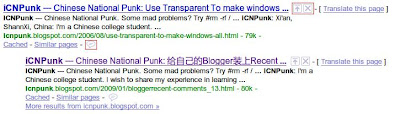
 以及自己添加搜索结果的功能。
三个被红框框起来的按键分便是Promote Remove Comment。
以及自己添加搜索结果的功能。该功能只能在Google帐户登陆后才可使用。
以下是Google对SearchWiki功能的介绍:
SearchWikiSearchWiki lets you customize your Google Web Search results by ranking, removing, and adding notes to them. You'll see your changes whenever you do the same searches while signed in to your Google Account, or until you decide to undo them. You can also see how other users have tailored any given search results page with their own notes and changes.
How to use SearchWikiHere's how you can rank, remove, add, and comment on search results:
Like a certain search result?
Click
to move it to the top of the page. This result will appear at the top whenever you do the same search in the future. We'll add this marker
next to it so you'll recognize it later.
Don't like a result?
Click
to remove it, and it'll remain hidden whenever you do the same search in the future.
Know of a better webpage?
Click Add a result at the bottom of any search results page to add a page that you consider relevant to that search. Type the URL in the box, then click Add. When you do this search in the future, you'll see the page you suggested at the top with this marker
Want to comment on a result?
Click
to open a text box and type your comment. You'll see it the next time this result appears for any of your searches. Comments are a great way to save and recall any thoughts you had or notes you took about a particular page.
Your rankings and comments are associated with your Google Account, so they affect only your search result rankings. A listing of your changes is visible on your 'SearchWiki notes' page, which is visible only to you.
Check out our video to see SearchWiki in action.
Do I have to be signed in to use SearchWiki?Yes. To see the changes you've made to a given search result the next time you do that search, you must be signed in to your Google Account. If you aren't signed in, you'll simply see standard, unmodified Google Web Search results.
How can I undo changes I've made?Here's how to undo changes made using SearchWiki.
Can others see my rankings, deletions, and notes?
- If you'd like to return a result you've promoted to its original position, click the down arrow next to the result.
- If you want to restore a deleted page to your search results, click the Show them link at the bottom of the results page (next to 'You have removed results from this page'), then click Restore.
- To delete a comment you've made, click the Delete comment link.
- Finally, if you added a new page to a set of search results, you can remove it by clicking the
The SearchWiki notes page that summarizes your rankings, deletions, and notes can be viewed only by you.
Is my email address displayed to other users?No. Other users who view your SearchWiki notes see only your Google Account nickname. (Note that you can see your email address in the top right of your screen when you're signed in to your own Google Account.) You can edit your nickname by clicking My Account in the top right corner of the screen while you're signed in. Learn more about Google Accounts.
How do I report inappropriate or offensive comments?While viewing any comment, click the thumbs-down next to it to rate it as bad. Click the Flag as inappropriate content link to report a comment as inappropriate. A Google team will review the comment and, if necessary, take
How do I share my feedback with you?
action.Have a suggestion on how we can improve SearchWiki? Take our survey (right now, it's available only in English).
You can also share your feedback in the Web Search Help Forum.
 to move it to the top of the page. This result will appear at the top whenever you do the same search in the future. We'll add this marker
  next to it so you'll recognize it later.
 to remove it, and it'll remain hidden whenever you do the same search in the future.
 to open a text box and type your comment. You'll see it the next time this result appears for any of your searches. Comments are a great way to save and recall any thoughts you had or notes you took about a particular page.
梦梦出品的QQ完全美化(未完)
美化说明:
详情请看梦梦空间:
http://dreamxis.blogbus.com/tag/QQ/
梦梦做的QQ美化我真的超级喜欢,但是他当时做美化时的DLL文件放到新的QQ版本上不适用,今天晚上我花了整整三个小时时间把他的资源移植过来了。废话少说,上图先:
QQ主界面以及任务栏图标均已经改成梦梦的了
首先从上面任意一个地址下载QQ2008II Beta1,删除以前的QQ版本,安装此版。在安装时不要选择美化QQ。
然后下载下面两个QQ2008主题文件解压并放置到QQ主文件夹Newskins目录下:
pRincess
Aperture
这两个主题预览分别对应上面给出的预览图。
然后下载我今天花了三个小时制作的DLL文件:
LoginCtrlRes.dll_QQRes.dll_UNCOMP.rar
解压这个文件并把QQ关闭,将其中的LoginCtrlRes.dll和QQRes.dll两个文件一同覆盖到QQ主文件夹下。
最后,打开QQ,尽情享受梦梦带给大家无限的惊喜吧!
---浪费时间也要浪费到正地方!
详情请看梦梦空间:
http://dreamxis.blogbus.com/tag/QQ/
梦梦做的QQ美化我真的超级喜欢,但是他当时做美化时的DLL文件放到新的QQ版本上不适用,今天晚上我花了整整三个小时时间把他的资源移植过来了。废话少说,上图先:
QQ主界面以及任务栏图标均已经改成梦梦的了
Aperture


QQ登陆界面改为:
 但是菜单以及载入画面都还没有更改,今天太累啦,有时间再做吧。
此美化基于腾讯QQ2008II Beta1 狂人DIY版 Ver20090110制作,此QQ下载地址:
MD5校验码:05e4b571c1373e1186912582dcd8d441 (QQ2008.exe)
美化方法:首先从上面任意一个地址下载QQ2008II Beta1,删除以前的QQ版本,安装此版。在安装时不要选择美化QQ。
然后下载下面两个QQ2008主题文件解压并放置到QQ主文件夹Newskins目录下:
pRincess
Aperture
这两个主题预览分别对应上面给出的预览图。
然后下载我今天花了三个小时制作的DLL文件:
LoginCtrlRes.dll_QQRes.dll_UNCOMP.rar
解压这个文件并把QQ关闭,将其中的LoginCtrlRes.dll和QQRes.dll两个文件一同覆盖到QQ主文件夹下。
最后,打开QQ,尽情享受梦梦带给大家无限的惊喜吧!
---浪费时间也要浪费到正地方!
Saturday, January 17, 2009
Gny的电子书列表,别说不够看啊~!!!
 GNY's About Us:
Go Null Yourself was founded in an effort to create a community where hackers and programmers could conjugate to learn and share with each other. There are too many websites that promote "script-kiddies" and not enough quality resources. Here at GNY, the main focus is to not only learn about hacking, coding, and anything related with advanced computing, but to actually understand it. The same concept applies in real life. You may learn about an equation in math that solves a problem, but do you know why it solves it and how the equation was crafted? If you have a question, want to submit something, or just want to talk, we'll be happy to answer any queries you may have. Most of the time, the admins can be contacted via IRC. If neither is there, wait a bit and one will most likely show up. You can also email sToRm or m0nkee at their respective email addresses.
- Apache
- Assembly
- ASP.NET
- BSD
- C
- C++
- C#
- Cisco
- Cracking and Reverse Engineering
- Cryptography
- Firewalls
- Forensics
- Graphics and Web Design
- HTML, CSS, RSS, and XML
- Linux
- Lockpicking
- Macintosh
- Malware
- Microsoft
- Miscellaneous
- Networking and Wireless
- Open Source
- Oracle
- Perl
- PHP and MySQL
- PostgreSQL
- Python
- Ruby
- Solaris
- SQL
- Sun, Java, and JS
- Visual Basic
给Blogger添加Twitter工具栏
还是使用简单的JavaScript调用的办法。
添加一个HTML/JavaScript的小工具,填入以下内容:
由于我模板的原因,在显示内容的时候会在前面留下一部分的空隙,所以在Blogger模板里面添加以下内容到<head></head>之间:
添加一个HTML/JavaScript的小工具,填入以下内容:
<div class="widget-content">
<div id="twitter_div"><ul id="twitter_update_list"></ul></div>
<script type="text/javascript" src="http://twitter.com/javascripts/blogger.js"></script>
<script type="text/javascript" src="http://twitter.com/statuses/user_timeline/zeronenorez.json?callback=twitterCallback2&count=20"></script>
<a href="http://twitter.com/zeronenorez" target="_blank">ReadMore</a>
</div>
</div>
将其中红色的部分改成自己的Twitter用户名即可!由于我模板的原因,在显示内容的时候会在前面留下一部分的空隙,所以在Blogger模板里面添加以下内容到<head></head>之间:
#twitter_div {width: 250px;margin-$startSide:-45px}
这样做的目的是把工具栏内容向前挪动45px的距离,这样就和标题对齐了。
Friday, January 16, 2009
终于知道卡巴斯基更新状态永远是0%是怎么回事啦!
诶呀妈呀,这几天真能把人郁闷死,不知何时卡巴斯基的病毒库就再也没有更新过,原以为是破解版卡巴斯基出什么问题了,换了好几个版本,换了巨多的Key,几乎所有的更新源。可是一点作用不起,永远是“ 更新永远是0%,然后操作超时,任务未被启动”。今天在深度论坛上无意中发现了问题的关键:GDI++与卡巴2009冲突导致卡巴更新不了。
解决办法:只要在GDI++.ini的[UnloadDLL]下面加入AVP.exe文件,禁止GDI++渲染卡巴斯基就可以了,今天卡巴终于开始更新拉!HOHO~
Tuesday, January 13, 2009
给自己的Blogger装上Recent Comments功能
以前装这个功能的时候走了很多弯路,看了很多说的复杂而且莫名其妙的教程,装上了一个外国网站提供的评论功能,终于可以在侧边栏上显示评论了,很漂亮。但是那个网站是用他自己的服务器存储留言数据的,然后每次再从外国网站上调用出来,速度实在没法恭维。如果需要那个漂亮评论栏的同志可以上这个网站:http://www.intensedebate.com/
这里提供一个更快速更简单的办法:
首先下载JS代码:
http://noodleblog.googlepages.com/rc4.js
把这个代码放到自己的ftp或者GooglePages上,没有Google账号的同志Mail我,我可以给你发邀请函。
然后在Blogger页面元素里面添加一个HTML/JavaScript。填入以下代码:
蓝色部分替换为自己的博客地址,红色部分替换自己上传的JS代码,保存就可以了 。
---勤思考,苦钻研!
这里提供一个更快速更简单的办法:
首先下载JS代码:
http://noodleblog.googlepages.com/rc4.js
把这个代码放到自己的ftp或者GooglePages上,没有Google账号的同志Mail我,我可以给你发邀请函。
然后在Blogger页面元素里面添加一个HTML/JavaScript。填入以下代码:
<div class="widget-content">
<script>g_szBlogDomain='icnpunk.blogspot.com';
var g_szHead='';</script><script src="http://noodleblog.googlepages.com/rc4.js"></script>
</div>
蓝色部分替换为自己的博客地址,红色部分替换自己上传的JS代码,保存就可以了 。
---勤思考,苦钻研!
Sunday, January 11, 2009
给自己的Blogger装上继续阅读功能
综合了网上众多关于给Blogger加入Readmore的教程,大致分为一下三类:
首先是直接展开的方法;参考文章:Blogger hack: Expandable posts with Peekaboo view
中文教程参阅这里:http://joshnote.blogspot.com/2007/03/blogger-hacks-in-joshs-lifetagsread.html
教程中的JS代码地址已经不能使用了,这个是手快的兄弟转存的:http://rarunach.googlepages.com/hackosphere.js
说出去不怕丢人,这个方法我居然没有试成功。。。
其次是换链接的方法;参考文章:Blogger Beta 繼續閱讀功能改良
中文教程参阅这里:http://joshnote.blogspot.com/2007/03/blogger-hacks-in-joshs-lifetagsread.html
最后是使用Chen Jim Hao的傻瓜程序:http://cjhtech.blogspot.com/2007/02/blogger-3-htmlfor-blogger.html
综合了一下上面的几种方法我最重选择了第二个,因为更改方便,速度快,第三个傻瓜程序会有一定的延迟。每次载入的时候会先全部显示出来一段时间才缩进去,而第二种方法因为通过更改模板实现的,每次载入时只是一闪而过,很是迅速。
给出本博客使用的加入继续阅读功能的模板(跳转查看):
替换时还是要注意先勾选扩展窗口小部件模板的选框保存再覆盖。
---人说漂亮的女人最毒恶,追求漂亮总是要付出代价的。
首先是直接展开的方法;参考文章:Blogger hack: Expandable posts with Peekaboo view
中文教程参阅这里:http://joshnote.blogspot.com/2007/03/blogger-hacks-in-joshs-lifetagsread.html
教程中的JS代码地址已经不能使用了,这个是手快的兄弟转存的:http://rarunach.googlepages.com/hackosphere.js
说出去不怕丢人,这个方法我居然没有试成功。。。
其次是换链接的方法;参考文章:Blogger Beta 繼續閱讀功能改良
中文教程参阅这里:http://joshnote.blogspot.com/2007/03/blogger-hacks-in-joshs-lifetagsread.html
最后是使用Chen Jim Hao的傻瓜程序:http://cjhtech.blogspot.com/2007/02/blogger-3-htmlfor-blogger.html
综合了一下上面的几种方法我最重选择了第二个,因为更改方便,速度快,第三个傻瓜程序会有一定的延迟。每次载入的时候会先全部显示出来一段时间才缩进去,而第二种方法因为通过更改模板实现的,每次载入时只是一闪而过,很是迅速。
给出本博客使用的加入继续阅读功能的模板(跳转查看):
<?xml version="1.0" encoding="UTF-8" ?><!DOCTYPE html PUBLIC "-//W3C//DTD XHTML 1.0 Strict//EN" "http://www.w3.org/TR/xhtml1/DTD/xhtml1-strict.dtd"><html expr:dir='data:blog.languageDirection' xmlns='http://www.w3.org/1999/xhtml' xmlns:b='http://www.google.com/2005/gml/b' xmlns:data='http://www.google.com/2005/gml/data' xmlns:expr='http://www.google.com/2005/gml/expr'><head><b:include data='blog' name='all-head-content'/><meta content='GWGgp/NB6IXNcjSWRSnwinNduxUiVSTNeTzbQGwRt4M=' name='verify-v1'/><title><data:blog.pageTitle/></title><b:skin><![CDATA[/** Blogger Template Style* Herbert** by Jason Sutter* Updated by Blogger Team*/
/** Variable definitions* ====================
<Variable name="mainBgColor" description="Page Background Color"type="color" default="#ffffff" / value="#000000"><Variable name="mainTextColor" description="Text Color"type="color" default="#000000" / value="#008000">
<Variable name="titleBgColor" description="Blog Title Background Color"type="color" default="#ff4500" / value="#008000"><Variable name="titleColor" description="Blog Title Color"type="color" default="#fffafa"/ value="#000000"><Variable name="descriptionBgColor" description="Description Background Color"type="color" default="#ffebcd" / value="#000000"><Variable name="descriptionColor" description="Blog Description Color"type="color" default="#9e5205" / value="#008000">
<Variable name="dateHeaderColor" description="Date Header Color"type="color" default="#777777" / value="#008000">
<Variable name="postTitleColor" description="Post Title Color"type="color" default="#555555" / value="#00ff00"><Variable name="postTitleBgColor" description="Post Title Background Color"type="color" default="#eeeeee" / value="#004000">
<Variable name="postFooterColor" description="Post Footer Color"type="color" default="#444444" / value="#004000">
<Variable name="mainLinkColor" description="Link Color"type="color" default="#de7008" / value="#00ff00"><Variable name="mainVisitedLinkColor" description="Visited Link Color"type="color" default="#e0ad12" / value="#004000">
<Variable name="sidebarTitleColor" description="Sidebar Title Color"type="color" default="#ff4500" / value="#008000">
<Variable name="sidebarLinkColor" description="Sidebar Link Color"type="color" default="#999999" / value="#00ff00"><Variable name="sidebarVisitedLinkColor"description="Sidebar Visited Link Color"type="color" default="#de7008" / value="#004000">
<Variable name="bodyFont" description="Text Font"type="font" default="normal normal 90% 'Trebuchet MS', Trebuchet, Verdana, Sans-Serif" / value="normal normal 79% Trebuchet, Trebuchet MS, Arial, sans-serif"><Variable name="titleFont" description="Blog Title Font"type="font" default="normal bold 266% Verdana, Sans-Serif" / value="normal bold 187% Trebuchet, Trebuchet MS, Arial, sans-serif"><Variable name="descriptionFont" description="Blog Description Font"type="font" default="normal bold 85% Verdana, Sans-Serif" / value="normal bold 85% Verdana, sans-serif"><Variable name="postTitleFont" description="Post Title Font"type="font" default="normal bold 110% Verdana, Sans-serif" value="normal bold 110% Verdana, Sans-serif"><Variable name="sidebarTitleFont" description="Sidebar Title Font"type="font" default="normal bold 125% Verdana, Sans-Serif" / value="normal bold 100% Verdana, Sans-Serif"><Variable name="startSide" description="Start side in blog language"type="automatic" default="left" value="left"><Variable name="endSide" description="End side in blog language"type="automatic" default="right" value="left">*/body {margin: 0px;padding: 0px;background: $mainBgColor;color: $mainTextColor;font: $bodyFont;}
a {color: $mainLinkColor;text-decoration: none;}
a:hover {color: $mainVisitedLinkColor;text-decoration: underline;}
a:visited {color: $mainVisitedLinkColor;}
a img {border: 0;}
@media all {div#main-wrapper {float: $startSide;width: 72%;padding-top: 0;padding-$endSide: 1em;padding-bottom: 0px;padding-$startSide: 1em;word-wrap: break-word; /* fix for long text breaking sidebar float in IE */overflow: hidden; /* fix for long non-text content breaking IE sidebar float */}
div#sidebar-wrapper {margin: 0px;padding: 35px;text-align: $endSide;}
div#sidebar {width: 25%;float: $endSide;word-wrap: break-word; /* fix for long text breaking sidebar float in IE */overflow: hidden; /* fix for long non-text content breaking IE sidebar float */}}
#navbar-iframe {height:0px;visibility:hidden;display:none;}
#content-wrapper {margin-$endSide: 1em;}
@media handheld {div#main-wrapper {float: none;width: 90%;}
div#sidebar-wrapper {padding-top: 20px;padding-$endSide: 1em;padding-bottom: 0;padding-$startSide: 1em;text-align: $startSide;}}
#header {padding-top: 0px;padding-$endSide: 0px;padding-bottom: 8px;padding-$startSide: 0px;margin-top: 0px;margin-$endSide: 0px;margin-bottom: 20px;margin-$startSide: 0px;border-bottom: solid 2px $postTitleBgColor;border-top: solid 2px $descriptionBgColor;background: $descriptionBgColor;color: $descriptionColor;}
CODE {display: block; /* fixes a strange ie margin bug */font-family: Courier New;font-size: 9pt;overflow:auto;background: #191919 url(https://blogger.googleusercontent.com/img/b/R29vZ2xl/AVvXsEhnMMvmJSOQzhyK9f1RUhojYoYBtqRLgoWtzGQmV_N3sJdlBV18FpaueRHi3IMK-6at4npw6odc9aarQbYOpl68c4KKtuKNuM9JF0SwrM9PQ_Bjhje6AMXaKCiHcDJ_yLVWdwc9cHFwgOM/s1600/Code_BG.gif) left top repeat-y;border: 1px dashed #00ff00;margin:2px 3px;padding: 10px 10px 10px 21px;max-height:200px;line-height: 1.2em;}
blockquote {display: block; /* fixes a strange ie margin bug */font-family: Courier New;font-size: 9pt;background: #191919;margin:1em 20px;border:1px dashed #333333;padding-left: 1ex;}
h1 a:link {color: $titleColor;}
h1 a:visited {color: $titleColor;}
h1 {padding-top: 18px;padding-$endSide: 0px;padding-bottom: 10px;padding-$startSide: 5%;margin-top: 0px;margin-$endSide: 10px;margin-bottom: 8px;margin-$startSide: 0px;border-top: solid 9px $sidebarTitleColor;border-bottom: solid 1px $descriptionColor;color: $titleColor;background: $titleBgColor;font: $titleFont;}
.description {padding-top: 0px;padding-$endSide: 0px;padding-bottom: 0px;padding-$startSide: 5%;margin: 0px;color: $descriptionColor;background: transparent;font: $descriptionFont;}
h3 {margin-top: 0px;margin-$endSide: 10px;margin-bottom: 10px;margin-$startSide: 0px;padding-top: 2px;padding-$endSide: 0px;padding-bottom: 2px;padding-$startSide: 2px;color: $postTitleColor;background: $postTitleBgColor;font: $postTitleFont;}
h3.post-title a,h3.post-title a:visited {color: $postTitleColor;}
h2.date-header {margin-top: 10px;margin-$endSide: 0px;margin-bottom: 0px;margin-$startSide: 0px;padding-top: 0px;padding-$endSide: 0px;padding-bottom: 0px;padding-$startSide: 2%;color: $dateHeaderColor;font-size: 90%;text-align: $startSide;}
#sidebar h2 {margin: 0px;color: $sidebarTitleColor;font: $sidebarTitleFont;padding: 0px;border: none;}
#sidebar .widget {margin-top: 0px;margin-$endSide: 0px;margin-bottom: 33px;margin-$startSide: 5px;padding: 0;}
#sidebar ul {list-style-type: none;font-size: 95%;margin-top: 0;}
#sidebar li {margin: 5px;padding: 0px;list-style-type: none;font-size: 105%;}
.Blog {margin-top: 20px;}
.blog-posts, .feed-links {margin-$startSide: 10px;}
.feed-links {clear: both;line-height: 2.5em;}
.post {margin-top: 0;margin-$endSide: 0;margin-bottom: 30px;margin-$startSide: 0;font-size: 100%;}
.post-body {margin-top: 0;margin-$endSide: 6px;margin-bottom: 0;margin-$startSide: 5px;}
.post strong {font-weight: bold;}
#sidebar a {text-decoration: none;}
#sidebar a:link,#sidebar a:visited {color: $sidebarLinkColor;}
#sidebar a:active,#sidebar a:hover {color: $sidebarVisitedLinkColor;}
pre,code,strike,blockquote {color: #666666;}
.post-footer {padding-top: 0;padding-$endSide: 0;padding-bottom: 0;padding-$startSide: 5px;margin: 0px;color: $postFooterColor;font-size: 80%;}
#comments {padding-top: 2px;padding-$endSide: 0px;padding-bottom: 2px;padding-$startSide: 5px;font-size: 110%;font-weight: bold;font-family: Verdana,Sans-Serif;}
.comment-author {margin-top: 20px;}
.comment-body {margin-top: 10px;font-size: 100%;font-weight: normal;color: $mainTextColor;}
.comment-footer {padding: 0px;margin-bottom: 20px;color: $postFooterColor;font-size: 80%;font-weight: normal;display: inline;margin-$endSide: 10px;}
.deleted-comment {font-style: italic;color: gray;}
.comment-link {margin-$startSide: .6em;}
/* Profile----------------------------------------------- */.profile-textblock {clear: both;margin-$startSide: 0;}.profile-img {margin-top: 0;margin-$endSide: 0;margin-bottom: 5px;margin-$startSide: 5px;float: $endSide;}
.BlogArchive #ArchiveList {float: $endSide;}
.widget-content {margin-top: 0.5em;}
#sidebar .widget {clear: both;}
#blog-pager-newer-link {float: $startSide;}
.blog-pager-older-link {float: $endSide;}
.blog-pager {text-align: center;}
.clear {clear: both;}
/** Tweaks for subscribe widget */.widget-content .subscribe-wrapper {float: left;clear: left;margin: .2em;font-family: Arial,Sans-Serif;}
/** Tweaks for layout editor mode */body#layout #outer-wrapper {margin-top: 10px;}]]></b:skin>
<script type='text/Javascript'>function hidePost(postUrl){var label=document.getElementById("fullpost");if(label!=null){eA = document.createElement("a");eA.setAttribute("href",postUrl);eA.setAttribute("title","Read More");eA.appendChild(document.createTextNode("...Read More"));eB = document.createElement("p");eB.setAttribute("id","read-more");eB.appendChild(eA);label.parentNode.appendChild(eB);label.parentNode.removeChild(label);}}</script></head>
<body> <div id='outer-wrapper'><div id='wrap2'>
<!-- skip links for text browsers --><span id='skiplinks' style='display:none;'><a href='#main'>skip to main </a> <a href='#sidebar'>skip to sidebar</a></span>
<div id='header-wrapper'><b:section class='header' id='header' maxwidgets='1' showaddelement='no'><b:widget id='Header1' locked='true' title='iCNPunk --- Chinese National Punk (Header)' type='Header'><b:includable id='main'>
<b:if cond='data:useImage'> <b:if cond='data:imagePlacement == "REPLACE"'> <!--Show just the image, no text--> <div id='header-inner'> <a expr:href='data:blog.homepageUrl' style='display: block'> <img expr:alt='data:title' expr:height='data:height' expr:id='data:widget.instanceId + "_headerimg"' expr:src='data:sourceUrl' expr:width='data:width' style='display: block'/> </a> </div> <b:else/> <!-- Show image as background to text. You can't really calculate the width reliably in JS because margins are not taken into account by any of clientWidth, offsetWidth or scrollWidth, so we don't force a minimum width if the user is using shrink to fit. This results in a margin-width's worth of pixels being cropped. If the user is not using shrink to fit then we expand the header. --> <div expr:style='"background-image: url(\"" + data:sourceUrl + "\"); " + "background-position: " + data:backgroundPositionStyleStr + "; " + data:widthStyleStr + "min-height: " + data:height + "px;" + "_height: " + data:height + "px;" + "background-repeat: no-repeat; "' id='header-inner'> <div class='titlewrapper' style='background: transparent'> <h1 class='title' style='background: transparent; border-width: 0px'> <b:include name='title'/> </h1> </div> <b:include name='description'/> </div> </b:if> <b:else/> <!--No header image --> <div id='header-inner'> <div class='titlewrapper'> <h1 class='title'> <b:include name='title'/> </h1> </div> <b:include name='description'/> </div> </b:if></b:includable><b:includable id='title'> <b:if cond='data:blog.url == data:blog.homepageUrl'> <data:title/> <b:else/> <a expr:href='data:blog.homepageUrl'><data:title/></a> </b:if></b:includable><b:includable id='description'> <div class='descriptionwrapper'> <p class='description'><span><data:description/></span></p> </div></b:includable></b:widget></b:section></div>
<div id='content-wrapper'>
<div id='crosscol-wrapper' style='text-align:center'><b:section class='crosscol' id='crosscol' showaddelement='no'/></div>
<div id='main-wrapper'><b:section class='main' id='main' showaddelement='no'><b:widget id='Blog1' locked='true' title='Blog Posts' type='Blog'><b:includable id='nextprev'> <div class='blog-pager' id='blog-pager'> <b:if cond='data:newerPageUrl'> <span id='blog-pager-newer-link'> <a class='blog-pager-newer-link' expr:href='data:newerPageUrl' expr:id='data:widget.instanceId + "_blog-pager-newer-link"' expr:title='data:newerPageTitle'><data:newerPageTitle/></a> </span> </b:if>
<b:if cond='data:olderPageUrl'> <span id='blog-pager-older-link'> <a class='blog-pager-older-link' expr:href='data:olderPageUrl' expr:id='data:widget.instanceId + "_blog-pager-older-link"' expr:title='data:olderPageTitle'><data:olderPageTitle/></a> </span> </b:if>
<b:if cond='data:blog.homepageUrl != data:blog.url'> <a class='home-link' expr:href='data:blog.homepageUrl'><data:homeMsg/></a> <b:else/> <b:if cond='data:newerPageUrl'> <a class='home-link' expr:href='data:blog.homepageUrl'><data:homeMsg/></a> </b:if> </b:if>
</div> <div class='clear'/></b:includable><b:includable id='backlinks' var='post'> <a name='links'/><h4><data:post.backlinksLabel/></h4> <b:if cond='data:post.numBacklinks != 0'> <dl class='comments-block' id='comments-block'> <b:loop values='data:post.backlinks' var='backlink'> <div class='collapsed-backlink backlink-control'> <dt class='comment-title'> <span class='backlink-toggle-zippy'> </span> <a expr:href='data:backlink.url' rel='nofollow'><data:backlink.title/></a> <b:include data='backlink' name='backlinkDeleteIcon'/> </dt> <dd class='comment-body collapseable'> <data:backlink.snippet/> </dd> <dd class='comment-footer collapseable'> <span class='comment-author'><data:post.authorLabel/> <data:backlink.author/></span> <span class='comment-timestamp'><data:post.timestampLabel/> <data:backlink.timestamp/></span> </dd> </div> </b:loop> </dl> </b:if> <p class='comment-footer'> <a class='comment-link' expr:href='data:post.createLinkUrl' expr:id='data:widget.instanceId + "_backlinks-create-link"' target='_blank'><data:post.createLinkLabel/></a> </p></b:includable><b:includable id='post' var='post'> <div class='post hentry'> <a expr:name='data:post.id'/> <b:if cond='data:post.title'> <h3 class='post-title entry-title'> <b:if cond='data:post.link'> <a expr:href='data:post.link'><data:post.title/></a> <b:else/> <b:if cond='data:post.url'> <a expr:href='data:post.url'><data:post.title/></a> <b:else/> <data:post.title/> </b:if> </b:if> </h3> </b:if>
<div class='post-header-line-1'/>
<div class='post-body entry-content'> <data:post.body/>
<b:if cond='data:blog.pageType != "item"'><b:if cond='data:post.url'><script type='text/javascript'>hidePost('<data:post.url/>');</script></b:if></b:if>
<div style='clear: both;'/> <!-- clear for photos floats --> </div>
<div class='post-footer'> <div class='post-footer-line post-footer-line-1'><span class='post-timestamp'> <b:if cond='data:top.showTimestamp'> <data:top.timestampLabel/> <b:if cond='data:post.url'> <a class='timestamp-link' expr:href='data:post.url' rel='bookmark' title='permanent link'><abbr class='published' expr:title='data:post.timestampISO8601'><data:post.timestamp/></abbr></a> </b:if> </b:if> </span> <span class='post-comment-link'> <b:if cond='data:blog.pageType != "item"'> <b:if cond='data:post.allowComments'> <a class='comment-link' expr:href='data:post.addCommentUrl' expr:onclick='data:post.addCommentOnclick'><b:if cond='data:post.numComments == 1'>1 <data:top.commentLabel/><b:else/><data:post.numComments/> <data:top.commentLabelPlural/></b:if></a> </b:if> </b:if> </span> <span class='post-backlinks post-comment-link'> <b:if cond='data:blog.pageType != "item"'> <b:if cond='data:post.showBacklinks'> <a class='comment-link' expr:href='data:post.url + "#links"'><data:top.backlinkLabel/></a> </b:if> </b:if> </span> <span class='post-icons'> <!-- email post links --> <b:if cond='data:post.emailPostUrl'> <span class='item-action'> <a expr:href='data:post.emailPostUrl' expr:title='data:top.emailPostMsg'> <img alt='' class='icon-action' height='13' src='http://www.blogger.com/img/icon18_email.gif' width='18'/> </a> </span> </b:if>
<!-- quickedit pencil --> <b:include data='post' name='postQuickEdit'/> </span> </div>
<div class='post-footer-line post-footer-line-2'/>
<div class='post-footer-line post-footer-line-3'/> </div> </div></b:includable><b:includable id='commentDeleteIcon' var='comment'> <span expr:class='"item-control " + data:comment.adminClass'> <a expr:href='data:comment.deleteUrl' expr:title='data:top.deleteCommentMsg'> <img src='http://www.blogger.com/img/icon_delete13.gif'/> </a> </span></b:includable><b:includable id='status-message'> <b:if cond='data:navMessage'> <div class='status-msg-wrap'> <div class='status-msg-body'> <data:navMessage/> </div> <div class='status-msg-border'> <div class='status-msg-bg'> <div class='status-msg-hidden'><data:navMessage/></div> </div> </div> </div> <div style='clear: both;'/> </b:if></b:includable><b:includable id='feedLinks'> <b:if cond='data:blog.pageType != "item"'> <!-- Blog feed links --> <b:if cond='data:feedLinks'> <div class='blog-feeds'> <b:include data='feedLinks' name='feedLinksBody'/> </div> </b:if>
<b:else/> <!--Post feed links --> <div class='post-feeds'> <b:loop values='data:posts' var='post'> <b:if cond='data:post.allowComments'> <b:if cond='data:post.feedLinks'> <b:include data='post.feedLinks' name='feedLinksBody'/> </b:if> </b:if> </b:loop> </div> </b:if></b:includable><b:includable id='comment-form' var='post'> <div class='comment-form'> <a name='comment-form'/> <h4 id='comment-post-message'><data:postCommentMsg/></h4> <p><data:blogCommentMessage/></p> <data:blogTeamBlogMessage/> <a expr:href='data:post.commentFormIframeSrc' id='comment-editor-src'/> <iframe allowtransparency='true' class='blogger-iframe-colorize' frameborder='0' height='275' id='comment-editor' scrolling='no' src='' width='100%'/> <data:post.iframeColorizer/> </div></b:includable><b:includable id='backlinkDeleteIcon' var='backlink'> <span expr:class='"item-control " + data:backlink.adminClass'> <a expr:href='data:backlink.deleteUrl' expr:title='data:top.deleteBacklinkMsg'> <img src='http://www.blogger.com/img/icon_delete13.gif'/> </a> </span></b:includable><b:includable id='feedLinksBody' var='links'> <div class='feed-links'> <data:feedLinksMsg/> <b:loop values='data:links' var='f'> <a class='feed-link' expr:href='data:f.url' expr:type='data:f.mimeType' target='_blank'><data:f.name/> (<data:f.feedType/>)</a> </b:loop> </div></b:includable><b:includable id='postQuickEdit' var='post'> <b:if cond='data:post.editUrl'> <span expr:class='"item-control " + data:post.adminClass'> <a expr:href='data:post.editUrl' expr:title='data:top.editPostMsg'> <img alt='' class='icon-action' height='18' src='http://www.blogger.com/img/icon18_edit_allbkg.gif' width='18'/> </a> </span> </b:if></b:includable><b:includable id='comments' var='post'> <div class='comments' id='comments'> <a name='comments'/> <b:if cond='data:post.allowComments'> <h4> <b:if cond='data:post.numComments == 1'> 1 <data:commentLabel/>: <b:else/> <data:post.numComments/> <data:commentLabelPlural/>: </b:if> </h4>
<b:if cond='data:post.commentPagingRequired'> <span class='paging-control-container'> <a expr:class='data:post.oldLinkClass' expr:href='data:post.oldestLinkUrl'><data:post.oldestLinkText/></a> <a expr:class='data:post.oldLinkClass' expr:href='data:post.olderLinkUrl'><data:post.olderLinkText/></a> <data:post.commentRangeText/> <a expr:class='data:post.newLinkClass' expr:href='data:post.newerLinkUrl'><data:post.newerLinkText/></a> <a expr:class='data:post.newLinkClass' expr:href='data:post.newestLinkUrl'><data:post.newestLinkText/></a> </span> </b:if>
<dl id='comments-block'> <b:loop values='data:post.comments' var='comment'> <dt expr:class='"comment-author " + data:comment.authorClass' expr:id='data:comment.anchorName'> <a expr:name='data:comment.anchorName'/> <b:if cond='data:comment.authorUrl'> <a expr:href='data:comment.authorUrl' rel='nofollow'><data:comment.author/></a> <b:else/> <data:comment.author/> </b:if> <data:commentPostedByMsg/> </dt> <dd class='comment-body'> <b:if cond='data:comment.isDeleted'> <span class='deleted-comment'><data:comment.body/></span> <b:else/> <p><data:comment.body/></p> </b:if> </dd> <dd class='comment-footer'> <span class='comment-timestamp'> <a expr:href='data:comment.url' title='comment permalink'> <data:comment.timestamp/> </a> <b:include data='comment' name='commentDeleteIcon'/> </span> </dd> </b:loop> </dl>
<b:if cond='data:post.commentPagingRequired'> <span class='paging-control-container'> <a expr:class='data:post.oldLinkClass' expr:href='data:post.oldestLinkUrl'> <data:post.oldestLinkText/> </a> <a expr:class='data:post.oldLinkClass' expr:href='data:post.olderLinkUrl'> <data:post.olderLinkText/> </a> <data:post.commentRangeText/> <a expr:class='data:post.newLinkClass' expr:href='data:post.newerLinkUrl'> <data:post.newerLinkText/> </a> <a expr:class='data:post.newLinkClass' expr:href='data:post.newestLinkUrl'> <data:post.newestLinkText/> </a> </span> </b:if>
<p class='comment-footer'>
<b:if cond='data:post.embedCommentForm'> <b:include data='post' name='comment-form'/> <b:else/> <b:if cond='data:post.allowComments'> <a expr:href='data:post.addCommentUrl' expr:onclick='data:post.addCommentOnclick'><data:postCommentMsg/></a> </b:if> </b:if>
</p> </b:if>
<div id='backlinks-container'> <div expr:id='data:widget.instanceId + "_backlinks-container"'> <b:if cond='data:post.showBacklinks'> <b:include data='post' name='backlinks'/> </b:if> </div> </div> </div></b:includable><b:includable id='main' var='top'> <!-- posts --> <div class='blog-posts hfeed'>
<b:include data='top' name='status-message'/>
<data:adStart/> <b:loop values='data:posts' var='post'> <b:if cond='data:post.dateHeader'> <h2 class='date-header'><data:post.dateHeader/></h2> </b:if> <b:include data='post' name='post'/> <b:if cond='data:blog.pageType == "item"'> <b:include data='post' name='comments'/> </b:if> <b:if cond='data:post.includeAd'> <data:adEnd/> <data:adCode/> <data:adStart/> </b:if> </b:loop> <data:adEnd/> </div>
<!-- navigation --> <b:include name='nextprev'/>
<!-- feed links --> <b:include name='feedLinks'/> <b:if cond='data:top.showStars'> <script src='http://www.google.com/jsapi' type='text/javascript'/> <script type='text/javascript'> google.load("annotations", "1", {"locale": "<data:top.languageCode/>"}); function initialize() { google.annotations.setApplicationId(<data:top.blogspotReviews/>); google.annotations.createAll(); google.annotations.fetch(); } google.setOnLoadCallback(initialize); </script> </b:if>
</b:includable></b:widget></b:section></div>
<div id='sidebar-wrapper'><b:section class='sidebar' id='sidebar' preferred='yes'><b:widget id='HTML4' locked='false' title='Search This Blog' type='HTML'><b:includable id='main'> <!-- only display title if it's non-empty --> <b:if cond='data:title != ""'> <h2 class='title'><data:title/></h2> </b:if> <div class='widget-content'> <data:content/> </div>
<b:include name='quickedit'/></b:includable></b:widget><b:widget id='Profile1' locked='false' title='About Me' type='Profile'><b:includable id='main'> <b:if cond='data:title != ""'> <h2><data:title/></h2> </b:if> <div class='widget-content'> <b:if cond='data:team == "true"'> <!-- team blog profile --> <ul> <b:loop values='data:authors' var='i'> <li><a expr:href='data:i.userUrl'><data:i.display-name/></a></li> </b:loop> </ul>
<b:else/> <!-- normal blog profile -->
<b:if cond='data:photo.url != ""'> <a expr:href='data:userUrl'><img class='profile-img' expr:alt='data:photo.alt' expr:height='data:photo.height' expr:src='data:photo.url' expr:width='data:photo.width'/></a> </b:if>
<dl class='profile-datablock'> <dt class='profile-data'><data:displayname/></dt>
<b:if cond='data:showlocation == "true"'> <dd class='profile-data'><data:location/></dd> </b:if>
<b:if cond='data:aboutme != ""'><dd class='profile-textblock'><data:aboutme/></dd></b:if> </dl> <a class='profile-link' expr:href='data:userUrl'><data:viewProfileMsg/></a> </b:if>
<b:include name='quickedit'/> </div> </b:includable></b:widget><b:widget id='TextList1' locked='false' title='Connect' type='TextList'><b:includable id='main'> <h2><data:title/></h2> <div class='widget-content'> <ul> <b:loop values='data:items' var='item'> <li><data:item/></li> </b:loop> </ul> <b:include name='quickedit'/> </div></b:includable></b:widget><b:widget id='Followers1' locked='false' title='Followers' type='Followers'><b:includable id='main'> <b:if cond='data:title != ""'> <b:if cond='data:codeSnippet != ""'> <h2 class='title'><data:title/></h2> <b:else/> <b:if cond='data:totalFollowerCount != ""'> <h2 class='title'><data:title/> (<data:totalFollowerCount/>)</h2> </b:if> </b:if> </b:if>
<div expr:id='data:widget.instanceId + "-wrapper"'> <b:if cond='data:codeSnippet != ""'> <div style='margin:2px;'> <data:codeSnippet/> </div> <b:else/> <b:if cond='data:totalFollowerCount == ""'> <span class='item-control following-not-admin'> <b><data:failureSnippet/></b> </span> <span class='item-control blog-admin'> <b><data:adminFailureSnippet/></b> </span> <b:else/> <b:if cond='data:followingLinkPresent'> <div class='follow-this profile-link item-control following-follow-this'> <a expr:href='"javascript:_FollowersView._openPopup(\"" + data:followUri + "\");"'> <data:followThisMessage/> </a> </div> <div class='follow-this profile-link item-control following-stop-following-this'> <a expr:href='"javascript:_FollowersView._openPopup(\"" + data:followUri + "\");"'> <data:stopFollowingMessage/> </a> </div> </b:if>
<div class='followers-grid'> <b:if cond='data:totalFollowerCount == 0'> <div class='profile-link item-control following-follow-this'> <data:emptyFollowersMessage/> </div> </b:if> <!-- Relies on the js written out in navbar.gxp --> <b:loop values='data:followers' var='follower'> <div class='follower'> <a expr:href='data:follower.profileUrl' expr:title='data:follower.displayName' rel='nofollow'> <img class='follower-img' expr:alt='data:follower.displayName' expr:height='data:follower.imageHeight' expr:onerror='"this.onerror=null;this.src=\"" + data:anonFollowerImageUrl + "\";"' expr:onload='"setAttributeOnload(this, \"src\", \"" + data:follower.imageUrl + "\")"' expr:width='data:follower.imageWidth' src='http://img1.blogblog.com/img/blank.gif'/> </a> </div> </b:loop> <div class='clear'/> </div>
<div class='followers-canvas profile-link'> <data:followersFooterMessage/> <span class='item-control following-not-admin'> <a expr:href='data:followersUri'> <data:viewAllMessage/> </a> </span> <span class='item-control blog-admin'> <a expr:href='data:manageFollowersUri'> <data:manageFollowersMessage/> </a> </span> </div> </b:if> </b:if> <b:include name='quickedit'/> </div></b:includable></b:widget><b:widget id='BlogArchive1' locked='false' title='Blog Archive' type='BlogArchive'><b:includable id='main'> <b:if cond='data:title'> <h2><data:title/></h2> </b:if> <div class='widget-content'> <div id='ArchiveList'> <div expr:id='data:widget.instanceId + "_ArchiveList"'> <b:if cond='data:style == "HIERARCHY"'> <b:include data='data' name='interval'/> </b:if> <b:if cond='data:style == "FLAT"'> <b:include data='data' name='flat'/> </b:if> <b:if cond='data:style == "MENU"'> <b:include data='data' name='menu'/> </b:if> </div> </div> <b:include name='quickedit'/> </div></b:includable><b:includable id='flat' var='data'> <ul> <b:loop values='data:data' var='i'> <li class='archivedate'> <a expr:href='data:i.url'><data:i.name/></a> (<data:i.post-count/>) </li> </b:loop> </ul></b:includable><b:includable id='menu' var='data'> <select expr:id='data:widget.instanceId + "_ArchiveMenu"'> <option value=''><data:title/></option> <b:loop values='data:data' var='i'> <option expr:value='data:i.url'><data:i.name/> (<data:i.post-count/>)</option> </b:loop> </select></b:includable><b:includable id='interval' var='intervalData'> <b:loop values='data:intervalData' var='i'> <ul> <li expr:class='"archivedate " + data:i.expclass'> <b:include data='i' name='toggle'/> <a class='post-count-link' expr:href='data:i.url'><data:i.name/></a> <span class='post-count' dir='ltr'>(<data:i.post-count/>)</span> <b:if cond='data:i.data'> <b:include data='i.data' name='interval'/> </b:if> <b:if cond='data:i.posts'> <b:include data='i.posts' name='posts'/> </b:if> </li> </ul> </b:loop></b:includable><b:includable id='toggle' var='interval'> <b:if cond='data:interval.toggleId'> <b:if cond='data:interval.expclass == "expanded"'> <a class='toggle' expr:href='data:widget.actionUrl + "&action=toggle" + "&dir=close&toggle=" + data:interval.toggleId + "&toggleopen=" + data:toggleopen'> <span class='zippy toggle-open'>▼ </span> </a> <b:else/> <a class='toggle' expr:href='data:widget.actionUrl + "&action=toggle" + "&dir=open&toggle=" + data:interval.toggleId + "&toggleopen=" + data:toggleopen'> <span class='zippy'> <b:if cond='data:blog.languageDirection == "rtl"'> ◄ <b:else/> ► </b:if> </span> </a> </b:if> </b:if></b:includable><b:includable id='posts' var='posts'> <ul class='posts'> <b:loop values='data:posts' var='i'> <li><a expr:href='data:i.url'><data:i.title/></a></li> </b:loop> </ul></b:includable></b:widget><b:widget id='Subscribe1' locked='false' title='Subscribe To' type='Subscribe'><b:includable id='main'> <b:if cond='data:isPublic'> <div style='white-space:nowrap'>
<b:if cond='data:title != ""'> <h2 class='title'><data:title/></h2> </b:if> <div class='widget-content'> <b:loop values='data:feeds' var='feed'> <div expr:class='"subscribe-wrapper subscribe-type-" + data:feed.type'>
<div expr:class='"subscribe expanded subscribe-type-" + data:feed.type' expr:id='"SW_READER_LIST_" + data:widgetId + data:feed.type' style='display:none;'>
<div class='top'> <span class='inner' expr:onclick='"return(_SW_toggleReaderList(event, \"" + data:widgetId +data:feed.type + "\"));"'> <img class='subscribe-dropdown-arrow' expr:src='data:arrowDropdownImg'/> <img align='absmiddle' alt='' border='0' class='feed-icon' expr:src='data:feedIconImg'/> <data:feed.title/> </span>
<ul class='feed-reader-links'> <a class='feed-reader-link' expr:href='"http://www.google.com/ig/add?source=bstp&feedurl=" + data:feed.encodedUrl' target='_blank'> <img expr:src='data:imagePathBase + "subscribe-google.png"'/> </a> <a class='feed-reader-link' expr:href='"http://www.bloglines.com/sub/" + data:feed.url' target='_blank'> <img expr:src='data:imagePathBase + "subscribe-bloglines.png"'/> </a> <a class='feed-reader-link' expr:href='"http://www.netvibes.com/subscribe.php?url=" + data:feed.encodedUrl' target='_blank'> <img expr:src='data:imagePathBase + "subscribe-netvibes.png"'/> </a> <a class='feed-reader-link' expr:href='"http://www.newsgator.com/ngs/subscriber/subext.aspx?url=" + data:feed.encodedUrl' target='_blank'> <img expr:src='data:imagePathBase + "subscribe-newsgator.png"'/> </a> <a class='feed-reader-link' expr:href='"http://add.my.yahoo.com/content?url=" + data:feed.encodedUrl' target='_blank'> <img expr:src='data:imagePathBase + "subscribe-yahoo.png"'/> </a> <a class='feed-reader-link' expr:href='data:feed.url' target='_blank'> <img align='absmiddle' class='feed-icon' expr:src='data:feedIconImg'/> Atom </a> </ul>
</div> <div class='bottom'/> </div> <div class='subscribe' expr:id='"SW_READER_LIST_CLOSED_" + data:widgetId +data:feed.type' expr:onclick='"return(_SW_toggleReaderList(event, \"" + data:widgetId +data:feed.type + "\"));"'> <div class='top'> <span class='inner'> <img class='subscribe-dropdown-arrow' expr:src='data:arrowDropdownImg'/> <span expr:onclick='"return(_SW_toggleReaderList(event, \"" + data:widgetId +data:feed.type + "\"));"'> <img align='absmiddle' alt='' border='0' class='feed-icon' expr:src='data:feedIconImg'/> <data:feed.title/> </span> </span> </div> <div class='bottom'/> </div> </div> </b:loop>
<div style='clear:both'/>
</div> </div>
<b:include name='quickedit'/>
</b:if></b:includable></b:widget><b:widget id='HTML2' locked='false' title='Music Player' type='HTML'><b:includable id='main'> <!-- only display title if it's non-empty --> <b:if cond='data:title != ""'> <h2 class='title'><data:title/></h2> </b:if> <div class='widget-content'> <data:content/> </div>
<b:include name='quickedit'/></b:includable></b:widget><b:widget id='HTML3' locked='false' title='Recent Comments' type='HTML'><b:includable id='main'> <!-- only display title if it's non-empty --> <b:if cond='data:title != ""'> <h2 class='title'><data:title/></h2> </b:if> <div class='widget-content'> <data:content/> </div>
<b:include name='quickedit'/></b:includable></b:widget><b:widget id='HTML1' locked='false' title='' type='HTML'><b:includable id='main'> <!-- only display title if it's non-empty --> <b:if cond='data:title != ""'> <h2 class='title'><data:title/></h2> </b:if> <div class='widget-content'> <data:content/> </div>
<b:include name='quickedit'/></b:includable></b:widget></b:section></div>
<!-- spacer for skins that want sidebar and main to be the same height--><div class='clear'> </div>
</div> <!-- end content-wrapper --></div></div> <!-- end outer-wrapper --></body></html> 替换时还是要注意先勾选扩展窗口小部件模板的选框保存再覆盖。
---人说漂亮的女人最毒恶,追求漂亮总是要付出代价的。
Friday, January 09, 2009
Palm Pre发布,股价上升35%
Palm 才刚发布 Palm Pre及新的 Web OS,股价就狂升35%啰!
小胖子准备复活了么?期待中...
Palm Pre 多图鉴赏:


小金库还有库存的同志们就赶快上手吧~!!
小胖子准备复活了么?期待中...
Palm Pre 多图鉴赏:
小金库还有库存的同志们就赶快上手吧~!!
Sunday, January 04, 2009
RHCE课本到手了,美一个!
今天拿到RHCE官方课本了,超级棒~~我说的是厚度。除了没本前面的介绍以外 033有407页、131(新的5.1教材中133的名称改成131了)有315页、253有356页,均包含Lab板块。如果在网上买到书的同学和这个不一样,嘿嘿,赶快找人算账吧~~
Subscribe to:
Posts (Atom)


 Posts
Posts



